
Guides / Radios & screens
What is iDatalink Maestro? (And do you need it?)
Maestro is a small module that lets a new radio talk to your car so you keep factory features on the new screen: steering-wheel controls, the factory amp, chimes, cameras, and often climate and gauge info.
It's a translator between an aftermarket radio and your car's computer. It keeps features a plain harness can't. You need it on a lot of newer or amplified cars; simpler older cars just need a basic harness.
What it does
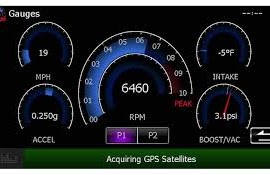
The current module is the iDatalink Maestro RR2 (the older RR still works). It plugs into your car's data network and, with a compatible radio, retains and displays factory features. Depending on the exact vehicle it can keep steering-wheel controls, the factory amplifier, chimes and warning sounds, the backup camera, parking sensors, on-screen gauges, vehicle info, and on some vehicles climate controls and tire pressure. Exactly which features it keeps varies by vehicle. That's why I check your specific car.
What's compatible
It works with "iDatalink-ready" radios from Kenwood, JVC, Alpine, Sony and Pioneer. Without an iDatalink-ready radio you only get basic retention (steering controls and amp turn-on).
What's needed
Three things: the Maestro module, a vehicle-specific T-harness that plugs into your car, and sometimes a dash kit. Before the install I flash the module online with the firmware for your exact car and map your steering-wheel buttons. That setup step is what makes it all work.
Realistic parts cost
The RR2 module runs around $250–320 depending on where you buy it; the vehicle-specific T-harness is usually $35–90 on its own, and module-plus-harness bundles run roughly $210–360 depending on the car. Your radio is separate. Prices move, so check the listing.
Which vehicles typically need it
Usually need Maestro or a data interface: newer Jeep/Ram with Uconnect, Honda with a factory display or amp, GM trucks with Bose or chimes, Toyota with JBL, Subaru with a factory amp, Ford with SYNC.
Often just a basic harness: many older or base-model cars without a factory amp or complex display.
Alternatives
Axxess, PAC and CRUX make similar interfaces. Sometimes they're the better or only option for a given car. I pick whichever properly keeps your features.
What it costs to install (labor only, parts separate)
Maestro / iDatalink integration: +$50–75 on top of the radio install · Radio / CarPlay: from $125
Common mistakes
- Buying a plain harness for a car that needed Maestro, and losing the amp or chimes.
- Buying a radio that isn't iDatalink-ready, then only getting basic features.
- Expecting every feature on every car. Retention varies by vehicle.
FAQ
Does Maestro add features my car never had?
Mostly it keeps what you had and shows it on the new screen. Some extras like gauges can appear on compatible radios.
Will my steering-wheel buttons work?
Yes, that's a core function.
Is it worth the extra cost?
On amplified or feature-rich cars, absolutely. It's the difference between a clean upgrade and losing functions.
Who sets it up?
I flash and program it for your exact car.
What I need from you: year, make, model; whether you have a premium or amplified system; a dash photo; your city.
Related: The parts behind a radio install · Car radios explained
Not sure what your car needs?
Text me your year, make, model and what you want done. I'll tell you what fits and what it costs.